
xTool Fine Point Pen for M1 Ultra (0.4 Tip)
₹2,000.00 (Inc. GST) ₹305.08 GST Input (18%) Claimable with B2B Billing. Enter GST number at checkout.
Match My Price
Found the same machine cheaper elsewhere? Share the details below and we'll match that price.
Ship Location – Delhi Warehouse
Description
xTool M1 Ultra Fine Point Pen (0.4 Tip)
The xTool M1 Ultra Fine Point Pen (0.4 Tip) is a drawing accessory designed for the xTool M1 Ultra, allowing the machine to automatically draw designs and artwork on compatible materials. With a 0.4 mm tip and a set of 8 colors, this pen accessory adds colorful drawing capabilities to the M1 Ultra for projects involving paper, acrylic, and other suitable surfaces.
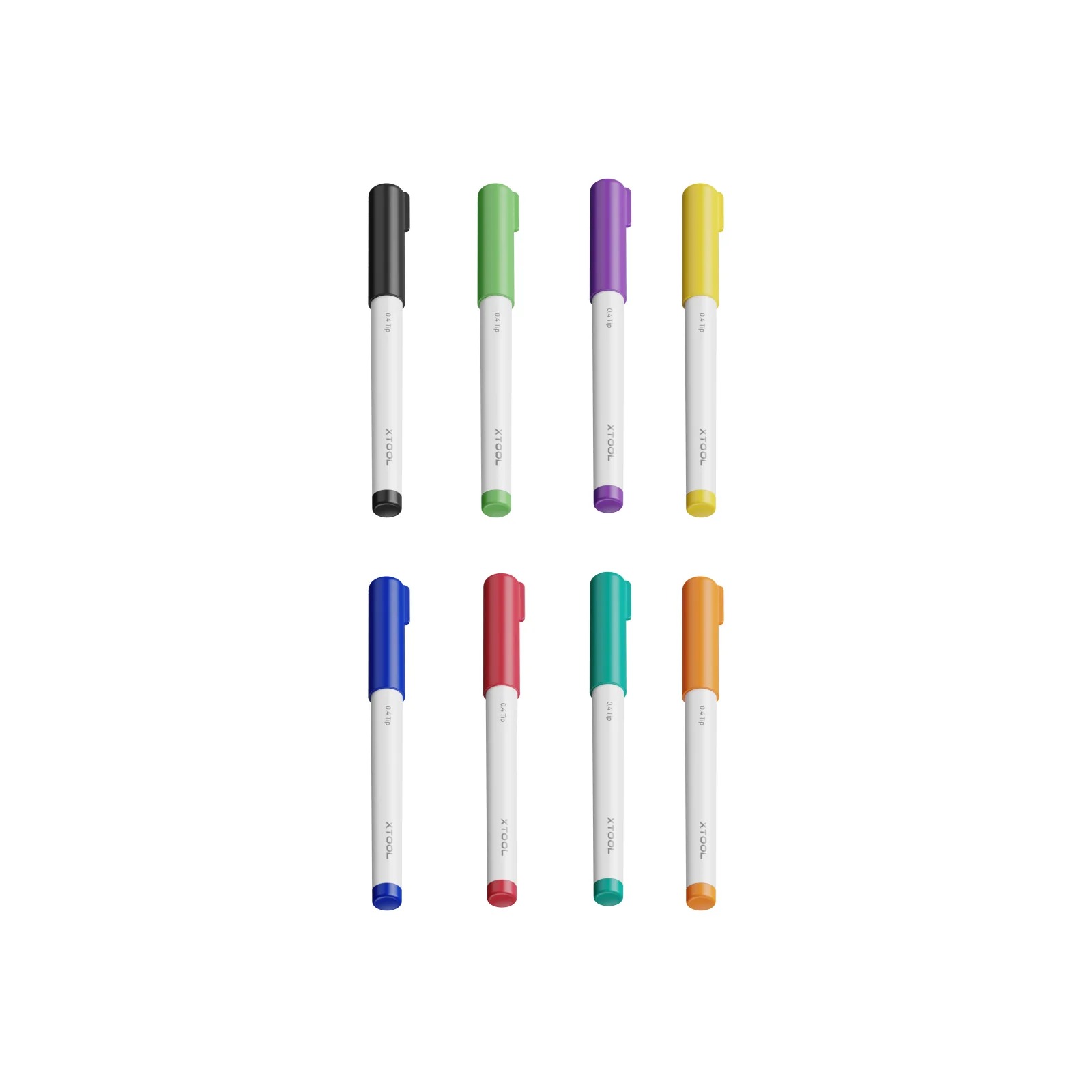
The included colors are Red, Orange, Yellow, Asparagus, Teal Blue, Royal Blue, Violet, and Black, giving users a selection of colors for creating detailed drawings, patterns, lettering, illustrations, and personalized craft projects.
Key Features
- Designed for the xTool M1 Ultra
- Fine 0.4 mm tip
- Includes 8 colors
- Red
- Orange
- Yellow
- Asparagus
- Teal Blue
- Royal Blue
- Violet
- Black
- Installs on the compatible M1 Ultra module
- Enables automatic drawing
- Suitable for paper, acrylic, and other compatible materials
Fine 0.4 mm Tip for Detailed Drawing
The xTool M1 Ultra Fine Point Pen uses a 0.4 mm tip, making it suitable for creating fine lines and detailed artwork with the M1 Ultra. The fine-point format is useful when a project requires controlled lines, lettering, outlines, or other drawn elements.
The pen is designed to work with the M1 Ultra’s automated movement, allowing the machine to reproduce digital designs as physical drawings rather than requiring the user to draw each element manually.
8 Color Options
The xTool M1 Ultra 0.4 Tip Pen includes eight different colors:
| Color | Included |
|---|---|
| Red | Yes |
| Orange | Yes |
| Yellow | Yes |
| Asparagus | Yes |
| Teal Blue | Yes |
| Royal Blue | Yes |
| Violet | Yes |
| Black | Yes |
The range of colors allows users to create more varied artwork without having to rely on a single-color pen. The included color selection can be useful for decorative designs, illustrations, personalized cards, craft projects, and other drawing applications supported by the M1 Ultra.
Automatic Drawing with the M1 Ultra
Once installed on the appropriate M1 Ultra module, the xTool M1 Ultra Fine Point Pen can be used for automatic drawing. The M1 Ultra controls the movement required to reproduce the selected design, helping create consistent lines and shapes across the project.
This makes the pen useful for users who want to add a drawing function to their M1 Ultra workflow alongside the machine’s other available functions.
Drawing on Paper and Acrylic
According to xTool, the pen can automatically draw on paper, acrylic, and other suitable materials. This opens up additional creative possibilities for M1 Ultra users who want to create drawn designs rather than only cutting or processing materials.
Potential projects can include paper artwork, decorative designs, personalized craft pieces, acrylic projects, lettering, and other applications where drawing directly onto the material is appropriate.
Useful for Personalized Craft Projects
The xTool M1 Ultra Fine Point Pen (0.4 Tip) can be used for personalized and decorative work where automated drawing provides an advantage over manual drawing.
Depending on the selected material and project design, it can be useful for:
- Personalized paper projects
- Decorative artwork
- Drawn lettering and text
- Illustrations
- Patterns and line artwork
- Acrylic drawing applications
- Craft projects
- Colorful custom designs
- Small personalized products
The exact suitability of a material should be confirmed before production, particularly when working with materials other than those specifically identified by xTool.
xTool M1 Ultra Compatibility
The xTool M1 Ultra Fine Point Pen is specifically listed as an accessory for the xTool M1 Ultra. xTool’s M1 Ultra accessory listings identify the pen as compatible with the M1 Ultra and describe its installation on the module for automatic drawing.
This product should therefore be selected for an xTool M1 Ultra setup rather than assumed to be compatible with other xTool machines.
Fine Point Pen vs. Other M1 Ultra Tools
The M1 Ultra supports different accessory tools for different types of work. The Fine Point Pen is intended for drawing, while other M1 Ultra accessories are designed for tasks such as blade cutting, foil transfer, ink printing, or laser processing.
This makes the 0.4 Tip Pen particularly useful when the desired result is a drawn line, illustration, pattern, or other pen-created design rather than a cut or engraved result.
Specifications
| Specification | Details |
|---|---|
| Product | xTool M1 Ultra Fine Point Pen (0.4 Tip) |
| Compatible Machine | xTool M1 Ultra |
| Tip Size | 0.4 mm |
| Number of Colors | 8 |
| Colors | Red, Orange, Yellow, Asparagus, Teal Blue, Royal Blue, Violet, Black |
| Main Function | Automatic drawing |
| Featured Materials | Paper, acrylic, and other suitable materials |
The specifications above are based on the product information currently provided by xTool.
Practical Applications
The xTool M1 Ultra Fine Point Pen (0.4 Tip) can expand the creative applications of the M1 Ultra by adding automated pen drawing to projects.
It can be considered for:
Paper Crafts
Create drawn designs, lettering, illustrations, decorative patterns, and other paper-based projects with the M1 Ultra’s automated movement.
Acrylic Projects
The pen can also be used for drawing on acrylic according to xTool’s product information, providing another option for personalized acrylic work.
Colorful Artwork
With eight included colors, users can create more visually varied designs than with a single-color pen.
Personalized Designs
The automated drawing function can be useful for creating repeatable names, patterns, illustrations, and other personalized designs.
Why Choose the xTool M1 Ultra Fine Point Pen?
The xTool M1 Ultra Fine Point Pen (0.4 Tip) provides a simple way to add automated drawing and multiple colors to the M1 Ultra. Its 0.4 mm tip is designed for fine drawing, while the included eight-color selection provides greater flexibility for colorful craft and personalization projects.
For M1 Ultra users who want to combine automated machine control with pen-based artwork, this xTool M1 Ultra pen is a practical accessory for expanding the machine’s creative capabilities.








Reviews
There are no reviews yet.