





Essential Ink Set for O1 Omni Printer
₹21,199.00 (Inc. GST) ₹3,233.75 GST Input (18%) Claimable with B2B Billing. Enter GST number at checkout.
Match My Price
Found the same machine cheaper elsewhere? Share the details below and we'll match that price.
Ship Location – Delhi Warehouse
Description
Essential Ink Set for O1 Omni Printer
The Essential Ink Set for O1 Omni Printer is a complete replacement and maintenance ink package designed specifically for the xTool O1 Omni Printer. It combines the required printing inks with maintenance supplies, giving users a convenient way to replenish their printer without having to select individual ink cartridges separately.
The Essential Ink Set for O1 Omni Printer is available in three configurations: For Single UV, For Dual UV, and For DT+UV. Each package is matched to the corresponding O1 Omni Printer printhead configuration so users can select the ink set designed for their specific machine setup.
Key Features
- Designed specifically for xTool O1 Omni Printer
- Complete ink and maintenance package
- Available for Single UV, Dual UV, and DT+UV configurations
- Includes UV printing inks
- DT+UV package includes DT Fabric Ink
- Includes maintenance tanks
- Includes used ink cartridges
- Wide-gamut CMYK color system
- Matched with the xTool ICC Profile
- Suitable for printing on multiple compatible materials
- Water-based and low-odor inks
- GREENGUARD GOLD and OEKO-TEX certified according to xTool
Matched to Your O1 Omni Printer
The Essential Ink Set for O1 Omni Printer is designed around the different printhead configurations available for the O1 Omni Printer. Instead of purchasing a generic collection of inks, users can select the package that corresponds to their printer configuration.
The available options are Single UV, Dual UV, and DT+UV, with each configuration containing the inks and maintenance components intended for that setup.
This makes it easier to replenish printing supplies while reducing the chance of selecting incompatible ink types.
Single UV Ink Set
The For Single UV configuration includes six 125 ml UV inks in White, Black, Magenta, Yellow, Cyan, and Varnish.
It also includes one xTool Selected UV Maintenance Tank and one used ink cartridge.
| Included Item | Quantity |
|---|---|
| White UV Ink | 125 ml |
| Black UV Ink | 125 ml |
| Magenta UV Ink | 125 ml |
| Yellow UV Ink | 125 ml |
| Cyan UV Ink | 125 ml |
| Varnish UV Ink | 125 ml |
| UV Maintenance Tank | 1 |
| Used Ink Cartridge | 1 |
Dual UV Ink Set
The For Dual UV configuration is designed for O1 Omni Printer systems using the Dual UV configuration.
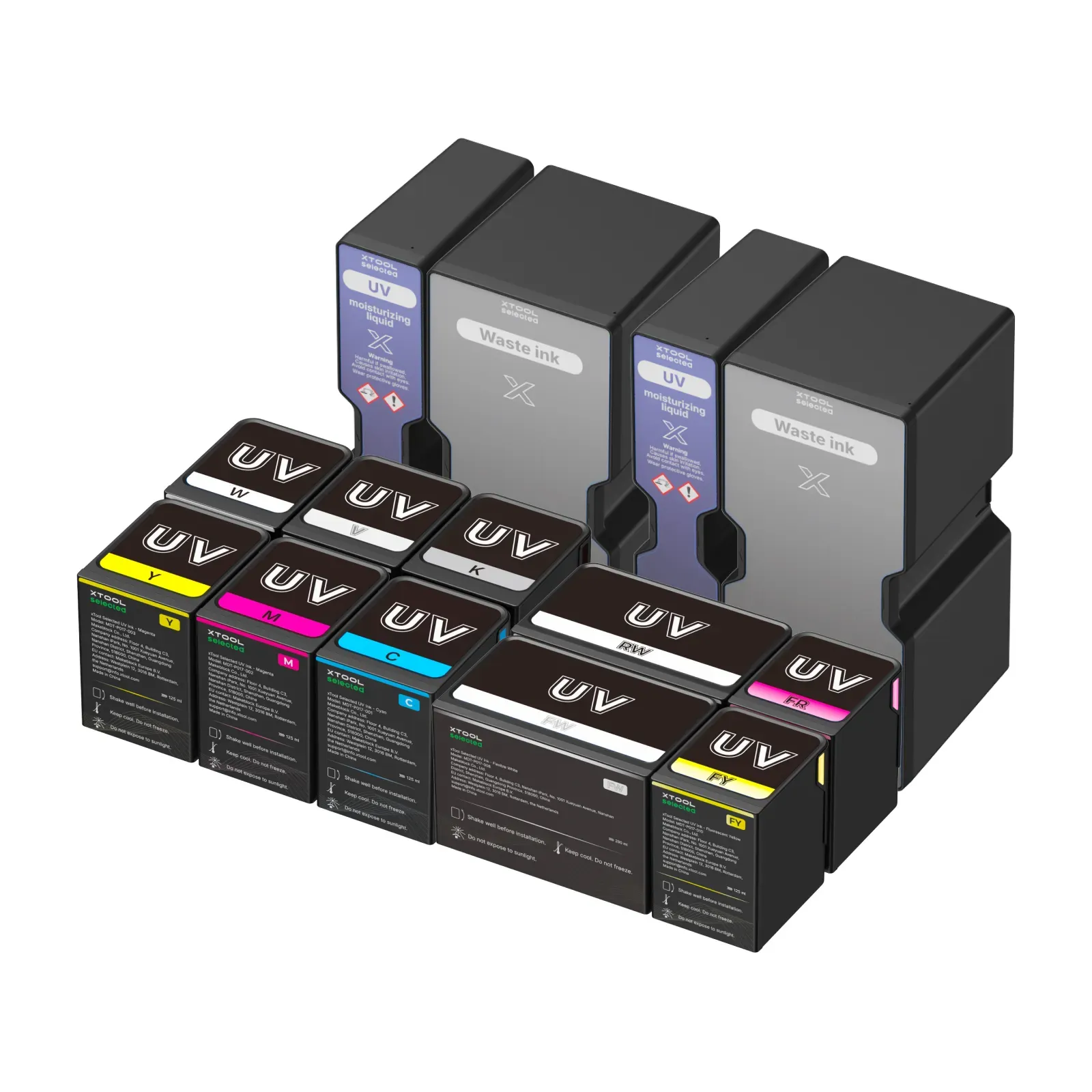
It includes six 125 ml UV inks in White, Black, Magenta, Yellow, Cyan, and Varnish, along with additional UV ink options consisting of 290 ml Flexible White and Rigid White, plus 125 ml Fluorescent Yellow and Fluorescent Red. The package also includes two 260 ml UV Maintenance Tanks and two used ink cartridges.
| Included Item | Quantity |
|---|---|
| White UV Ink | 125 ml |
| Black UV Ink | 125 ml |
| Magenta UV Ink | 125 ml |
| Yellow UV Ink | 125 ml |
| Cyan UV Ink | 125 ml |
| Varnish UV Ink | 125 ml |
| Flexible White UV Ink | 290 ml |
| Rigid White UV Ink | 290 ml |
| Fluorescent Yellow UV Ink | 125 ml |
| Fluorescent Red UV Ink | 125 ml |
| UV Maintenance Tank | 2 × 260 ml |
| Used Ink Cartridge | 2 |
DT+UV Ink Set
The For DT+UV configuration combines DT Fabric Ink with UV printing ink, making it suitable for the corresponding O1 Omni Printer configuration.
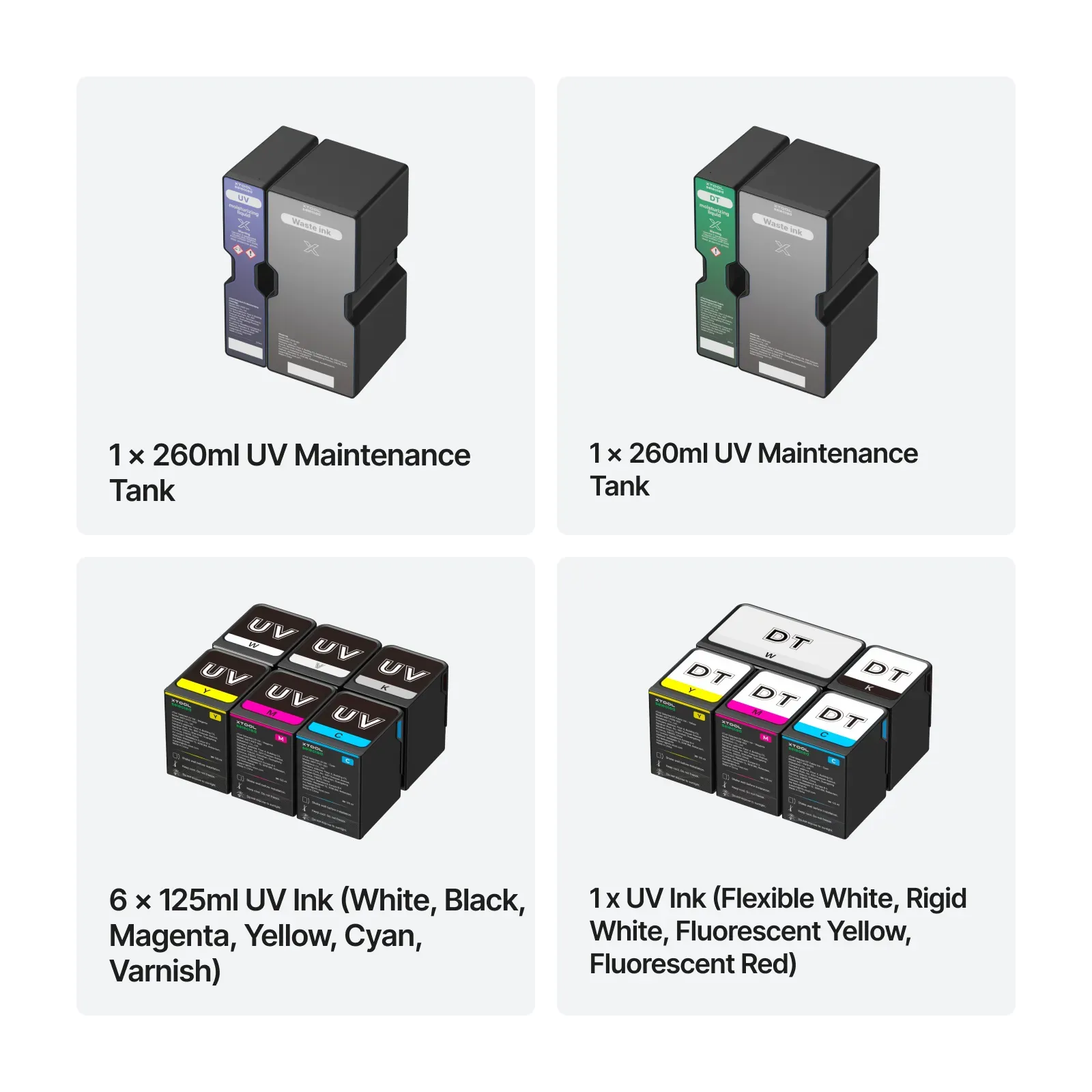
The package includes five DT Fabric Ink cartridges: 290 ml White and 125 ml Black, Yellow, Magenta, and Cyan. It also includes six 125 ml UV inks in White, Black, Magenta, Yellow, Cyan, and Varnish. Maintenance supplies include one 260 ml DT Maintenance Tank, one 260 ml UV Maintenance Tank, and two used ink cartridges.
| Included Item | Quantity |
|---|---|
| White DT Fabric Ink | 290 ml |
| Black DT Fabric Ink | 125 ml |
| Yellow DT Fabric Ink | 125 ml |
| Magenta DT Fabric Ink | 125 ml |
| Cyan DT Fabric Ink | 125 ml |
| White UV Ink | 125 ml |
| Black UV Ink | 125 ml |
| Magenta UV Ink | 125 ml |
| Yellow UV Ink | 125 ml |
| Cyan UV Ink | 125 ml |
| Varnish UV Ink | 125 ml |
| DT Maintenance Tank | 1 × 260 ml |
| UV Maintenance Tank | 1 × 260 ml |
| Used Ink Cartridge | 2 |
Rich and Accurate Color
The Essential Ink Set for O1 Omni Printer uses a wide-gamut CMYK ink system designed to produce bright and detailed colors. xTool states that the inks are matched with its ICC Profile to provide accurate and lifelike color reproduction.
The UV ink system includes Cyan, Magenta, Yellow, and Black as the core CMYK colors, along with White and Varnish for supported O1 Omni Printer configurations.
This combination allows the printer to produce colorful designs across a variety of compatible printing surfaces.
Printing on Multiple Materials
The Essential Ink Set for O1 Omni Printer is designed for the O1 Omni Printer’s UV printing workflow. xTool highlights applications across materials including fabric, acrylic, metal, wood, leather, and more, depending on the printer configuration and compatible material.
The actual print result can vary depending on the material, surface preparation, selected print mode, and printer settings.
Built-In Printhead Care
In addition to printing ink, the Essential Ink Set for O1 Omni Printer includes maintenance tanks designed to support regular printer maintenance.
xTool states that the included maintenance tank helps keep the printhead moist and clog-free, which can reduce downtime and help protect printhead life.
Keeping the appropriate maintenance supplies available is particularly useful for users who operate the O1 Omni Printer regularly.
Water-Based and Low-Odor Ink
The inks included in the Essential Ink Set for O1 Omni Printer are described by xTool as water-based and low-odor. xTool also identifies the inks as GREENGUARD GOLD and OEKO-TEX certified.
These characteristics make the ink system suitable for users who want an ink solution designed specifically around the O1 Omni Printer’s printing workflow.
Complete Ink Replenishment
The Essential Ink Set for O1 Omni Printer is designed around xTool’s “buy once, get everything” approach. Rather than requiring users to determine every compatible cartridge individually, the available package options group the appropriate inks and maintenance supplies according to the printer configuration.
This can simplify routine supply replenishment and help users maintain the necessary ink and maintenance components for their O1 Omni Printer.
Product Specifications
| Specification | Details |
|---|---|
| Product | Essential Ink Set for O1 Omni Printer |
| Compatible Machine | xTool O1 Omni Printer |
| Material Type | O1 UV Printing |
| Processing Mode | UV Printing |
| Package Options | Single UV, Dual UV, DT+UV |
| Core UV Colors | White, Black, Magenta, Yellow, Cyan, Varnish |
| Ink Type | Water-based, low-odor |
| Certification | GREENGUARD GOLD / OEKO-TEX |
| Maintenance Supplies | Maintenance tanks and used ink cartridges |
Specifications and package contents are based on xTool’s current product listing.
Choosing the Correct Package
When purchasing the Essential Ink Set for O1 Omni Printer, users should select the package corresponding to their O1 Omni Printer configuration.
| Package | Designed For |
|---|---|
| For Single UV | Single UV configuration |
| For Dual UV | Dual UV configuration |
| For DT+UV | DT + UV configuration |
Choosing the correct configuration is important because the included inks and maintenance components differ between the three packages.
Convenient Printer Maintenance
The Essential Ink Set for O1 Omni Printer combines everyday printing supplies with maintenance components in one package. Having replacement ink and maintenance tanks available can help users avoid interruptions caused by running out of essential consumables.
For businesses and makers using the O1 Omni Printer regularly, keeping the appropriate ink set available can make routine printing and maintenance easier to manage.
A Complete O1 Omni Printer Ink Solution
The Essential Ink Set for O1 Omni Printer provides a dedicated ink and maintenance solution for xTool’s O1 Omni Printer. With separate packages for Single UV, Dual UV, and DT+UV configurations, users can choose the set that matches their specific printer setup.
With wide-gamut CMYK UV inks, additional white and varnish options, configuration-specific DT Fabric Ink, maintenance tanks, and used ink cartridges, the Essential Ink Set for O1 Omni Printer is designed to simplify ink replenishment while supporting consistent printer maintenance.
Specification
 Overview
| Package | For Single UV, For Dual UV, For DT+UV |
|---|







Reviews
There are no reviews yet.